> ## Documentation Index
> Fetch the complete documentation index at: https://langchain-5e9cc07a-preview-docsup-1779999816-f03693e.mintlify.site/llms.txt
> Use this file to discover all available pages before exploring further.
# Agents
An agent is a model calling tools in a loop until a given task is complete.
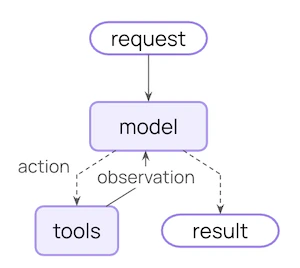 **Agent = Model + Harness**
The job of a harness: get the model the right context at the right time for the given task.
A harness is everything around that loop: the model, its prompt, its tools, and any middleware that shapes its behavior.
[`create_agent`](https://reference.langchain.com/python/langchain/agents/factory/create_agent) is a highly configurable harness. At its simplest:
```python theme={null}
from langchain.agents import create_agent
agent = create_agent("openai:gpt-5.4", tools=tools)
```
Configure the basics directly — `model=`, `tools=`, `system_prompt=`. For more advanced capabilities, extend the harness with [middleware](#configure-the-harness).
## Core components
### Model
Pass a model identifier string (`"provider:model"`) or an initialized model instance. See [Models](/oss/python/langchain/models) for parameters, provider setup, and dynamic model selection.
```python theme={null}
from langchain.agents import create_agent
agent = create_agent("openai:gpt-5.4", tools=tools)
```
### Tools
Pass any Python callable, LangChain tool, or tool dict. See [Tools](/oss/python/langchain/tools) for tool definition, context access, and dynamic tool selection.
```python theme={null}
from langchain.tools import tool
@tool
def search(query: str) -> str:
"""Search for information."""
return f"Results for: {query}"
agent = create_agent("openai:gpt-5.4", tools=[search])
```
### System prompt
Shape how the agent approaches tasks. Accepts a string or `SystemMessage`. For dynamic prompts at runtime, use [middleware](/oss/python/langchain/middleware).
```python theme={null}
agent = create_agent(
"openai:gpt-5.4",
tools=tools,
system_prompt="You are a helpful assistant. Be concise and accurate.",
)
```
### Structured output
Return a validated schema from the agent using `response_format=`. See [Structured output](/oss/python/langchain/structured-output) for strategies and examples.
```python theme={null}
from pydantic import BaseModel
from langchain.agents import create_agent
class Answer(BaseModel):
summary: str
confidence: float
agent = create_agent("openai:gpt-5.4", tools=tools, response_format=Answer)
result = agent.invoke({"messages": [{"role": "user", "content": "Summarize AI trends"}]})
result["structured_response"] # Answer(summary=..., confidence=...)
```
### Name
Optional identifier used as the node name when embedding this agent as a subgraph in [multi-agent](/oss/python/langchain/multi-agent) systems.
```python theme={null}
agent = create_agent("openai:gpt-5.4", tools=tools, name="research_assistant")
```
To extend the agent's state schema with custom fields, use [`state_schema`](/oss/python/langchain/long-term-memory) on `create_agent` or define it via middleware. See [Memory](/oss/python/langchain/long-term-memory) for details.
## Invocation
Trace each step of this loop, debug tool calls, and evaluate agent outputs with [LangSmith](https://smith.langchain.com?utm_source=docs\&utm_medium=cta\&utm_campaign=langsmith-signup\&utm_content=oss-langchain-agents). Follow the [tracing quickstart](/langsmith/trace-with-langchain) to get set up.
You can invoke an agent by passing an update to its [`State`](/oss/python/langgraph/graph-api#state). All agents include a [sequence of messages](/oss/python/langgraph/use-graph-api#messagesstate) in their state; to invoke the agent, pass a new message along with a `thread_id` so the agent can persist and resume conversation history:
```python Google theme={null}
from langchain.agents import create_agent
from langchain_core.utils.uuid import uuid7
from langgraph.checkpoint.memory import InMemorySaver
agent = create_agent(
model="google_genai:gemini-3.5-flash",
tools=[],
checkpointer=InMemorySaver(),
)
config = {"configurable": {"thread_id": str(uuid7())}}
result = agent.invoke(
{"messages": [{"role": "user", "content": "What's the weather in San Francisco?"}]},
config=config,
)
# A follow-up turn on the same conversation: reuse the same thread_id to keep history
result = agent.invoke(
{"messages": [{"role": "user", "content": "What about tomorrow?"}]},
config=config,
)
```
```python OpenAI theme={null}
from langchain.agents import create_agent
from langchain_core.utils.uuid import uuid7
from langgraph.checkpoint.memory import InMemorySaver
agent = create_agent(
model="openai:gpt-5.4",
tools=[],
checkpointer=InMemorySaver(),
)
config = {"configurable": {"thread_id": str(uuid7())}}
result = agent.invoke(
{"messages": [{"role": "user", "content": "What's the weather in San Francisco?"}]},
config=config,
)
# A follow-up turn on the same conversation: reuse the same thread_id to keep history
result = agent.invoke(
{"messages": [{"role": "user", "content": "What about tomorrow?"}]},
config=config,
)
```
```python Anthropic theme={null}
from langchain.agents import create_agent
from langchain_core.utils.uuid import uuid7
from langgraph.checkpoint.memory import InMemorySaver
agent = create_agent(
model="anthropic:claude-sonnet-4-6",
tools=[],
checkpointer=InMemorySaver(),
)
config = {"configurable": {"thread_id": str(uuid7())}}
result = agent.invoke(
{"messages": [{"role": "user", "content": "What's the weather in San Francisco?"}]},
config=config,
)
# A follow-up turn on the same conversation: reuse the same thread_id to keep history
result = agent.invoke(
{"messages": [{"role": "user", "content": "What about tomorrow?"}]},
config=config,
)
```
```python OpenRouter theme={null}
from langchain.agents import create_agent
from langchain_core.utils.uuid import uuid7
from langgraph.checkpoint.memory import InMemorySaver
agent = create_agent(
model="openrouter:anthropic/claude-sonnet-4-6",
tools=[],
checkpointer=InMemorySaver(),
)
config = {"configurable": {"thread_id": str(uuid7())}}
result = agent.invoke(
{"messages": [{"role": "user", "content": "What's the weather in San Francisco?"}]},
config=config,
)
# A follow-up turn on the same conversation: reuse the same thread_id to keep history
result = agent.invoke(
{"messages": [{"role": "user", "content": "What about tomorrow?"}]},
config=config,
)
```
```python Fireworks theme={null}
from langchain.agents import create_agent
from langchain_core.utils.uuid import uuid7
from langgraph.checkpoint.memory import InMemorySaver
agent = create_agent(
model="fireworks:accounts/fireworks/models/qwen3p5-397b-a17b",
tools=[],
checkpointer=InMemorySaver(),
)
config = {"configurable": {"thread_id": str(uuid7())}}
result = agent.invoke(
{"messages": [{"role": "user", "content": "What's the weather in San Francisco?"}]},
config=config,
)
# A follow-up turn on the same conversation: reuse the same thread_id to keep history
result = agent.invoke(
{"messages": [{"role": "user", "content": "What about tomorrow?"}]},
config=config,
)
```
```python Baseten theme={null}
from langchain.agents import create_agent
from langchain_core.utils.uuid import uuid7
from langgraph.checkpoint.memory import InMemorySaver
agent = create_agent(
model="baseten:zai-org/GLM-5",
tools=[],
checkpointer=InMemorySaver(),
)
config = {"configurable": {"thread_id": str(uuid7())}}
result = agent.invoke(
{"messages": [{"role": "user", "content": "What's the weather in San Francisco?"}]},
config=config,
)
# A follow-up turn on the same conversation: reuse the same thread_id to keep history
result = agent.invoke(
{"messages": [{"role": "user", "content": "What about tomorrow?"}]},
config=config,
)
```
```python Ollama theme={null}
from langchain.agents import create_agent
from langchain_core.utils.uuid import uuid7
from langgraph.checkpoint.memory import InMemorySaver
agent = create_agent(
model="ollama:devstral-2",
tools=[],
checkpointer=InMemorySaver(),
)
config = {"configurable": {"thread_id": str(uuid7())}}
result = agent.invoke(
{"messages": [{"role": "user", "content": "What's the weather in San Francisco?"}]},
config=config,
)
# A follow-up turn on the same conversation: reuse the same thread_id to keep history
result = agent.invoke(
{"messages": [{"role": "user", "content": "What about tomorrow?"}]},
config=config,
)
```
Persisting conversation history with `thread_id` requires the agent to be configured with a [checkpointer](/oss/python/langchain/long-term-memory). When deployed on [LangSmith](/langsmith/deployment), a checkpointer is provisioned automatically. Locally, pass one explicitly, for example `create_agent(..., checkpointer=InMemorySaver())`.
If you also need to pass per-run configuration (such as a user ID, API keys, or feature flags) to tools and middleware, pass it as `context` alongside `config`. Define the shape of that data with `context_schema` and access it through `runtime.context`:
```python Google theme={null}
from dataclasses import dataclass
from langchain.agents import create_agent
from langchain_core.utils.uuid import uuid7
from langchain_openai import ChatOpenAI
from langgraph.checkpoint.memory import InMemorySaver
@dataclass
class Context:
user_id: str
agent = create_agent(
model="google_genai:gemini-3.5-flash",
tools=[],
context_schema=Context,
checkpointer=InMemorySaver(),
)
result = agent.invoke(
{"messages": [{"role": "user", "content": "What's the weather in San Francisco?"}]},
config={"configurable": {"thread_id": str(uuid7())}},
context=Context(user_id="user-123"),
)
```
```python OpenAI theme={null}
from dataclasses import dataclass
from langchain.agents import create_agent
from langchain_core.utils.uuid import uuid7
from langchain_openai import ChatOpenAI
from langgraph.checkpoint.memory import InMemorySaver
@dataclass
class Context:
user_id: str
agent = create_agent(
model="openai:gpt-5.4",
tools=[],
context_schema=Context,
checkpointer=InMemorySaver(),
)
result = agent.invoke(
{"messages": [{"role": "user", "content": "What's the weather in San Francisco?"}]},
config={"configurable": {"thread_id": str(uuid7())}},
context=Context(user_id="user-123"),
)
```
```python Anthropic theme={null}
from dataclasses import dataclass
from langchain.agents import create_agent
from langchain_core.utils.uuid import uuid7
from langchain_openai import ChatOpenAI
from langgraph.checkpoint.memory import InMemorySaver
@dataclass
class Context:
user_id: str
agent = create_agent(
model="anthropic:claude-sonnet-4-6",
tools=[],
context_schema=Context,
checkpointer=InMemorySaver(),
)
result = agent.invoke(
{"messages": [{"role": "user", "content": "What's the weather in San Francisco?"}]},
config={"configurable": {"thread_id": str(uuid7())}},
context=Context(user_id="user-123"),
)
```
```python OpenRouter theme={null}
from dataclasses import dataclass
from langchain.agents import create_agent
from langchain_core.utils.uuid import uuid7
from langchain_openai import ChatOpenAI
from langgraph.checkpoint.memory import InMemorySaver
@dataclass
class Context:
user_id: str
agent = create_agent(
model="openrouter:anthropic/claude-sonnet-4-6",
tools=[],
context_schema=Context,
checkpointer=InMemorySaver(),
)
result = agent.invoke(
{"messages": [{"role": "user", "content": "What's the weather in San Francisco?"}]},
config={"configurable": {"thread_id": str(uuid7())}},
context=Context(user_id="user-123"),
)
```
```python Fireworks theme={null}
from dataclasses import dataclass
from langchain.agents import create_agent
from langchain_core.utils.uuid import uuid7
from langchain_openai import ChatOpenAI
from langgraph.checkpoint.memory import InMemorySaver
@dataclass
class Context:
user_id: str
agent = create_agent(
model="fireworks:accounts/fireworks/models/qwen3p5-397b-a17b",
tools=[],
context_schema=Context,
checkpointer=InMemorySaver(),
)
result = agent.invoke(
{"messages": [{"role": "user", "content": "What's the weather in San Francisco?"}]},
config={"configurable": {"thread_id": str(uuid7())}},
context=Context(user_id="user-123"),
)
```
```python Baseten theme={null}
from dataclasses import dataclass
from langchain.agents import create_agent
from langchain_core.utils.uuid import uuid7
from langchain_openai import ChatOpenAI
from langgraph.checkpoint.memory import InMemorySaver
@dataclass
class Context:
user_id: str
agent = create_agent(
model="baseten:zai-org/GLM-5",
tools=[],
context_schema=Context,
checkpointer=InMemorySaver(),
)
result = agent.invoke(
{"messages": [{"role": "user", "content": "What's the weather in San Francisco?"}]},
config={"configurable": {"thread_id": str(uuid7())}},
context=Context(user_id="user-123"),
)
```
```python Ollama theme={null}
from dataclasses import dataclass
from langchain.agents import create_agent
from langchain_core.utils.uuid import uuid7
from langchain_openai import ChatOpenAI
from langgraph.checkpoint.memory import InMemorySaver
@dataclass
class Context:
user_id: str
agent = create_agent(
model="ollama:devstral-2",
tools=[],
context_schema=Context,
checkpointer=InMemorySaver(),
)
result = agent.invoke(
{"messages": [{"role": "user", "content": "What's the weather in San Francisco?"}]},
config={"configurable": {"thread_id": str(uuid7())}},
context=Context(user_id="user-123"),
)
```
`thread_id` scopes the *conversation* (message history, checkpoints), while `context` carries *per-run* data your tools and middleware read at invocation time. Both are commonly passed together. See [tool context](/oss/python/langchain/tools#context) and [Runtime](/oss/python/langchain/runtime) for more.
### Streaming
We've seen how the agent can be called with `invoke` to get a final response. If the agent executes multiple steps, this may take a while. To show intermediate progress, we can stream back messages as they occur.
```python theme={null}
from langchain.messages import AIMessage, HumanMessage
for chunk in agent.stream({
"messages": [{"role": "user", "content": "Search for AI news and summarize the findings"}]
}, stream_mode="values"):
# Each chunk contains the full state at that point
latest_message = chunk["messages"][-1]
if latest_message.content:
if isinstance(latest_message, HumanMessage):
print(f"User: {latest_message.content}")
elif isinstance(latest_message, AIMessage):
print(f"Agent: {latest_message.content}")
elif latest_message.tool_calls:
print(f"Calling tools: {[tc['name'] for tc in latest_message.tool_calls]}")
```
For more details on streaming, see [Streaming](/oss/python/langchain/streaming).
## Configure the harness
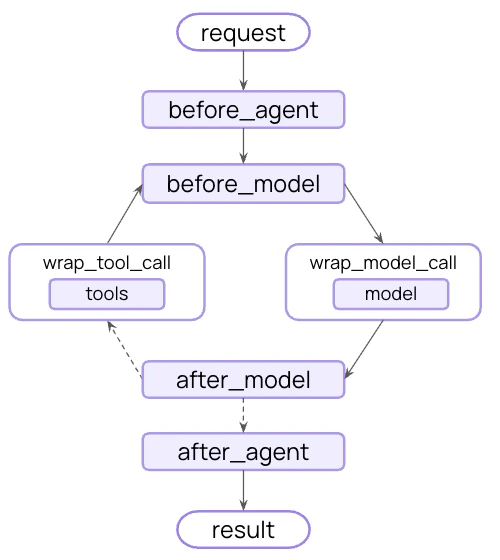
`create_agent` is highly extensible. Middleware is the primitive for customization: each piece handles one concern, hooks into the agent loop at the right moment, and composes freely with any other. Take exactly what your use case needs — skip the rest.
Common patterns are pre-built as first-class middleware. Anything custom is [one middleware away](/oss/python/langchain/middleware/custom).
**Agent = Model + Harness**
The job of a harness: get the model the right context at the right time for the given task.
A harness is everything around that loop: the model, its prompt, its tools, and any middleware that shapes its behavior.
[`create_agent`](https://reference.langchain.com/python/langchain/agents/factory/create_agent) is a highly configurable harness. At its simplest:
```python theme={null}
from langchain.agents import create_agent
agent = create_agent("openai:gpt-5.4", tools=tools)
```
Configure the basics directly — `model=`, `tools=`, `system_prompt=`. For more advanced capabilities, extend the harness with [middleware](#configure-the-harness).
## Core components
### Model
Pass a model identifier string (`"provider:model"`) or an initialized model instance. See [Models](/oss/python/langchain/models) for parameters, provider setup, and dynamic model selection.
```python theme={null}
from langchain.agents import create_agent
agent = create_agent("openai:gpt-5.4", tools=tools)
```
### Tools
Pass any Python callable, LangChain tool, or tool dict. See [Tools](/oss/python/langchain/tools) for tool definition, context access, and dynamic tool selection.
```python theme={null}
from langchain.tools import tool
@tool
def search(query: str) -> str:
"""Search for information."""
return f"Results for: {query}"
agent = create_agent("openai:gpt-5.4", tools=[search])
```
### System prompt
Shape how the agent approaches tasks. Accepts a string or `SystemMessage`. For dynamic prompts at runtime, use [middleware](/oss/python/langchain/middleware).
```python theme={null}
agent = create_agent(
"openai:gpt-5.4",
tools=tools,
system_prompt="You are a helpful assistant. Be concise and accurate.",
)
```
### Structured output
Return a validated schema from the agent using `response_format=`. See [Structured output](/oss/python/langchain/structured-output) for strategies and examples.
```python theme={null}
from pydantic import BaseModel
from langchain.agents import create_agent
class Answer(BaseModel):
summary: str
confidence: float
agent = create_agent("openai:gpt-5.4", tools=tools, response_format=Answer)
result = agent.invoke({"messages": [{"role": "user", "content": "Summarize AI trends"}]})
result["structured_response"] # Answer(summary=..., confidence=...)
```
### Name
Optional identifier used as the node name when embedding this agent as a subgraph in [multi-agent](/oss/python/langchain/multi-agent) systems.
```python theme={null}
agent = create_agent("openai:gpt-5.4", tools=tools, name="research_assistant")
```
To extend the agent's state schema with custom fields, use [`state_schema`](/oss/python/langchain/long-term-memory) on `create_agent` or define it via middleware. See [Memory](/oss/python/langchain/long-term-memory) for details.
## Invocation
Trace each step of this loop, debug tool calls, and evaluate agent outputs with [LangSmith](https://smith.langchain.com?utm_source=docs\&utm_medium=cta\&utm_campaign=langsmith-signup\&utm_content=oss-langchain-agents). Follow the [tracing quickstart](/langsmith/trace-with-langchain) to get set up.
You can invoke an agent by passing an update to its [`State`](/oss/python/langgraph/graph-api#state). All agents include a [sequence of messages](/oss/python/langgraph/use-graph-api#messagesstate) in their state; to invoke the agent, pass a new message along with a `thread_id` so the agent can persist and resume conversation history:
```python Google theme={null}
from langchain.agents import create_agent
from langchain_core.utils.uuid import uuid7
from langgraph.checkpoint.memory import InMemorySaver
agent = create_agent(
model="google_genai:gemini-3.5-flash",
tools=[],
checkpointer=InMemorySaver(),
)
config = {"configurable": {"thread_id": str(uuid7())}}
result = agent.invoke(
{"messages": [{"role": "user", "content": "What's the weather in San Francisco?"}]},
config=config,
)
# A follow-up turn on the same conversation: reuse the same thread_id to keep history
result = agent.invoke(
{"messages": [{"role": "user", "content": "What about tomorrow?"}]},
config=config,
)
```
```python OpenAI theme={null}
from langchain.agents import create_agent
from langchain_core.utils.uuid import uuid7
from langgraph.checkpoint.memory import InMemorySaver
agent = create_agent(
model="openai:gpt-5.4",
tools=[],
checkpointer=InMemorySaver(),
)
config = {"configurable": {"thread_id": str(uuid7())}}
result = agent.invoke(
{"messages": [{"role": "user", "content": "What's the weather in San Francisco?"}]},
config=config,
)
# A follow-up turn on the same conversation: reuse the same thread_id to keep history
result = agent.invoke(
{"messages": [{"role": "user", "content": "What about tomorrow?"}]},
config=config,
)
```
```python Anthropic theme={null}
from langchain.agents import create_agent
from langchain_core.utils.uuid import uuid7
from langgraph.checkpoint.memory import InMemorySaver
agent = create_agent(
model="anthropic:claude-sonnet-4-6",
tools=[],
checkpointer=InMemorySaver(),
)
config = {"configurable": {"thread_id": str(uuid7())}}
result = agent.invoke(
{"messages": [{"role": "user", "content": "What's the weather in San Francisco?"}]},
config=config,
)
# A follow-up turn on the same conversation: reuse the same thread_id to keep history
result = agent.invoke(
{"messages": [{"role": "user", "content": "What about tomorrow?"}]},
config=config,
)
```
```python OpenRouter theme={null}
from langchain.agents import create_agent
from langchain_core.utils.uuid import uuid7
from langgraph.checkpoint.memory import InMemorySaver
agent = create_agent(
model="openrouter:anthropic/claude-sonnet-4-6",
tools=[],
checkpointer=InMemorySaver(),
)
config = {"configurable": {"thread_id": str(uuid7())}}
result = agent.invoke(
{"messages": [{"role": "user", "content": "What's the weather in San Francisco?"}]},
config=config,
)
# A follow-up turn on the same conversation: reuse the same thread_id to keep history
result = agent.invoke(
{"messages": [{"role": "user", "content": "What about tomorrow?"}]},
config=config,
)
```
```python Fireworks theme={null}
from langchain.agents import create_agent
from langchain_core.utils.uuid import uuid7
from langgraph.checkpoint.memory import InMemorySaver
agent = create_agent(
model="fireworks:accounts/fireworks/models/qwen3p5-397b-a17b",
tools=[],
checkpointer=InMemorySaver(),
)
config = {"configurable": {"thread_id": str(uuid7())}}
result = agent.invoke(
{"messages": [{"role": "user", "content": "What's the weather in San Francisco?"}]},
config=config,
)
# A follow-up turn on the same conversation: reuse the same thread_id to keep history
result = agent.invoke(
{"messages": [{"role": "user", "content": "What about tomorrow?"}]},
config=config,
)
```
```python Baseten theme={null}
from langchain.agents import create_agent
from langchain_core.utils.uuid import uuid7
from langgraph.checkpoint.memory import InMemorySaver
agent = create_agent(
model="baseten:zai-org/GLM-5",
tools=[],
checkpointer=InMemorySaver(),
)
config = {"configurable": {"thread_id": str(uuid7())}}
result = agent.invoke(
{"messages": [{"role": "user", "content": "What's the weather in San Francisco?"}]},
config=config,
)
# A follow-up turn on the same conversation: reuse the same thread_id to keep history
result = agent.invoke(
{"messages": [{"role": "user", "content": "What about tomorrow?"}]},
config=config,
)
```
```python Ollama theme={null}
from langchain.agents import create_agent
from langchain_core.utils.uuid import uuid7
from langgraph.checkpoint.memory import InMemorySaver
agent = create_agent(
model="ollama:devstral-2",
tools=[],
checkpointer=InMemorySaver(),
)
config = {"configurable": {"thread_id": str(uuid7())}}
result = agent.invoke(
{"messages": [{"role": "user", "content": "What's the weather in San Francisco?"}]},
config=config,
)
# A follow-up turn on the same conversation: reuse the same thread_id to keep history
result = agent.invoke(
{"messages": [{"role": "user", "content": "What about tomorrow?"}]},
config=config,
)
```
Persisting conversation history with `thread_id` requires the agent to be configured with a [checkpointer](/oss/python/langchain/long-term-memory). When deployed on [LangSmith](/langsmith/deployment), a checkpointer is provisioned automatically. Locally, pass one explicitly, for example `create_agent(..., checkpointer=InMemorySaver())`.
If you also need to pass per-run configuration (such as a user ID, API keys, or feature flags) to tools and middleware, pass it as `context` alongside `config`. Define the shape of that data with `context_schema` and access it through `runtime.context`:
```python Google theme={null}
from dataclasses import dataclass
from langchain.agents import create_agent
from langchain_core.utils.uuid import uuid7
from langchain_openai import ChatOpenAI
from langgraph.checkpoint.memory import InMemorySaver
@dataclass
class Context:
user_id: str
agent = create_agent(
model="google_genai:gemini-3.5-flash",
tools=[],
context_schema=Context,
checkpointer=InMemorySaver(),
)
result = agent.invoke(
{"messages": [{"role": "user", "content": "What's the weather in San Francisco?"}]},
config={"configurable": {"thread_id": str(uuid7())}},
context=Context(user_id="user-123"),
)
```
```python OpenAI theme={null}
from dataclasses import dataclass
from langchain.agents import create_agent
from langchain_core.utils.uuid import uuid7
from langchain_openai import ChatOpenAI
from langgraph.checkpoint.memory import InMemorySaver
@dataclass
class Context:
user_id: str
agent = create_agent(
model="openai:gpt-5.4",
tools=[],
context_schema=Context,
checkpointer=InMemorySaver(),
)
result = agent.invoke(
{"messages": [{"role": "user", "content": "What's the weather in San Francisco?"}]},
config={"configurable": {"thread_id": str(uuid7())}},
context=Context(user_id="user-123"),
)
```
```python Anthropic theme={null}
from dataclasses import dataclass
from langchain.agents import create_agent
from langchain_core.utils.uuid import uuid7
from langchain_openai import ChatOpenAI
from langgraph.checkpoint.memory import InMemorySaver
@dataclass
class Context:
user_id: str
agent = create_agent(
model="anthropic:claude-sonnet-4-6",
tools=[],
context_schema=Context,
checkpointer=InMemorySaver(),
)
result = agent.invoke(
{"messages": [{"role": "user", "content": "What's the weather in San Francisco?"}]},
config={"configurable": {"thread_id": str(uuid7())}},
context=Context(user_id="user-123"),
)
```
```python OpenRouter theme={null}
from dataclasses import dataclass
from langchain.agents import create_agent
from langchain_core.utils.uuid import uuid7
from langchain_openai import ChatOpenAI
from langgraph.checkpoint.memory import InMemorySaver
@dataclass
class Context:
user_id: str
agent = create_agent(
model="openrouter:anthropic/claude-sonnet-4-6",
tools=[],
context_schema=Context,
checkpointer=InMemorySaver(),
)
result = agent.invoke(
{"messages": [{"role": "user", "content": "What's the weather in San Francisco?"}]},
config={"configurable": {"thread_id": str(uuid7())}},
context=Context(user_id="user-123"),
)
```
```python Fireworks theme={null}
from dataclasses import dataclass
from langchain.agents import create_agent
from langchain_core.utils.uuid import uuid7
from langchain_openai import ChatOpenAI
from langgraph.checkpoint.memory import InMemorySaver
@dataclass
class Context:
user_id: str
agent = create_agent(
model="fireworks:accounts/fireworks/models/qwen3p5-397b-a17b",
tools=[],
context_schema=Context,
checkpointer=InMemorySaver(),
)
result = agent.invoke(
{"messages": [{"role": "user", "content": "What's the weather in San Francisco?"}]},
config={"configurable": {"thread_id": str(uuid7())}},
context=Context(user_id="user-123"),
)
```
```python Baseten theme={null}
from dataclasses import dataclass
from langchain.agents import create_agent
from langchain_core.utils.uuid import uuid7
from langchain_openai import ChatOpenAI
from langgraph.checkpoint.memory import InMemorySaver
@dataclass
class Context:
user_id: str
agent = create_agent(
model="baseten:zai-org/GLM-5",
tools=[],
context_schema=Context,
checkpointer=InMemorySaver(),
)
result = agent.invoke(
{"messages": [{"role": "user", "content": "What's the weather in San Francisco?"}]},
config={"configurable": {"thread_id": str(uuid7())}},
context=Context(user_id="user-123"),
)
```
```python Ollama theme={null}
from dataclasses import dataclass
from langchain.agents import create_agent
from langchain_core.utils.uuid import uuid7
from langchain_openai import ChatOpenAI
from langgraph.checkpoint.memory import InMemorySaver
@dataclass
class Context:
user_id: str
agent = create_agent(
model="ollama:devstral-2",
tools=[],
context_schema=Context,
checkpointer=InMemorySaver(),
)
result = agent.invoke(
{"messages": [{"role": "user", "content": "What's the weather in San Francisco?"}]},
config={"configurable": {"thread_id": str(uuid7())}},
context=Context(user_id="user-123"),
)
```
`thread_id` scopes the *conversation* (message history, checkpoints), while `context` carries *per-run* data your tools and middleware read at invocation time. Both are commonly passed together. See [tool context](/oss/python/langchain/tools#context) and [Runtime](/oss/python/langchain/runtime) for more.
### Streaming
We've seen how the agent can be called with `invoke` to get a final response. If the agent executes multiple steps, this may take a while. To show intermediate progress, we can stream back messages as they occur.
```python theme={null}
from langchain.messages import AIMessage, HumanMessage
for chunk in agent.stream({
"messages": [{"role": "user", "content": "Search for AI news and summarize the findings"}]
}, stream_mode="values"):
# Each chunk contains the full state at that point
latest_message = chunk["messages"][-1]
if latest_message.content:
if isinstance(latest_message, HumanMessage):
print(f"User: {latest_message.content}")
elif isinstance(latest_message, AIMessage):
print(f"Agent: {latest_message.content}")
elif latest_message.tool_calls:
print(f"Calling tools: {[tc['name'] for tc in latest_message.tool_calls]}")
```
For more details on streaming, see [Streaming](/oss/python/langchain/streaming).
## Configure the harness
`create_agent` is highly extensible. Middleware is the primitive for customization: each piece handles one concern, hooks into the agent loop at the right moment, and composes freely with any other. Take exactly what your use case needs — skip the rest.
Common patterns are pre-built as first-class middleware. Anything custom is [one middleware away](/oss/python/langchain/middleware/custom).
 As agents take on complex work, they need support across a few key areas. The middleware ecosystem covers each:
Tools, filesystem, sandboxes, and code execution
Summarization, memory, skills, and prompt caching
Todo lists and subagents for parallel, isolated work
Retries, fallbacks, and call limits
PII detection and content controls
Human-in-the-loop approval before high-impact actions
### Execution environment
Agents are useful when they can take action — not just generate text. The execution environment gives the agent a workspace: tools it can call, a filesystem for reading and writing files across turns, and code execution for running scripts or shell commands.
```python theme={null}
from langchain.agents import create_agent
from deepagents.backends import StateBackend
from deepagents.middleware import FilesystemMiddleware
agent = create_agent(
model="anthropic:claude-sonnet-4-6",
tools=[search],
middleware=[FilesystemMiddleware(backend=StateBackend())],
)
```
See [`FilesystemMiddleware`](https://reference.langchain.com/python/deepagents/middleware/filesystem/FilesystemMiddleware), [Sandboxes](/oss/python/deepagents/sandboxes), [Interpreters](/oss/python/deepagents/interpreters).
### Context management
Every model call has a fixed context window. As an agent runs — accumulating history, tool results, and intermediate steps — that window fills. Summarization compresses history before overflow hits; memory loads persistent instructions at startup so knowledge carries across sessions; skills surface domain knowledge on demand rather than loading everything upfront.
```python theme={null}
from deepagents.backends import StateBackend
from deepagents.middleware import FilesystemMiddleware, MemoryMiddleware, SkillsMiddleware, SummarizationMiddleware
backend = StateBackend()
model = "anthropic:claude-sonnet-4-6"
agent = create_agent(
model=model,
tools=[search],
middleware=[
FilesystemMiddleware(backend=backend),
SummarizationMiddleware(model=model, backend=backend),
MemoryMiddleware(backend=backend, sources=["./AGENTS.md"]),
SkillsMiddleware(backend=backend, sources=["./skills/"]),
],
)
```
See [`SummarizationMiddleware`](https://reference.langchain.com/python/langchain/agents/middleware/summarization/SummarizationMiddleware), [`MemoryMiddleware`](https://reference.langchain.com/python/deepagents/middleware/memory/MemoryMiddleware), [`SkillsMiddleware`](https://reference.langchain.com/python/deepagents/middleware/skills/SkillsMiddleware), [Context engineering](/oss/python/deepagents/context-engineering).
### Planning and delegation
Complex tasks often exceed what one context window can handle. Delegation lets the main agent break work into pieces, hand them to subagents that each run in their own isolated context, and stay focused on coordination rather than execution. Work can run in parallel; the main agent's context stays clean.
```python theme={null}
from langchain.agents.middleware import TodoListMiddleware
from deepagents import SubAgent
from deepagents.middleware import FilesystemMiddleware, SubAgentMiddleware
researcher: SubAgent = {
"name": "researcher",
"description": "Searches and returns a structured summary.",
"tools": [search],
}
agent = create_agent(
model="anthropic:claude-sonnet-4-6",
tools=[search],
middleware=[
FilesystemMiddleware(backend=StateBackend()),
TodoListMiddleware(),
SubAgentMiddleware(backend=StateBackend(), subagents=[researcher]),
],
)
```
See [`SubAgentMiddleware`](https://reference.langchain.com/python/deepagents/middleware/subagents/SubAgentMiddleware), [Subagents](/oss/python/deepagents/subagents).
### Fault tolerance
Agents in production encounter failures that rarely appear in development: rate limits, model timeouts, transient API errors. Fault tolerance middleware handles these at the infrastructure level so your tools and business logic don't need try/catch around every call.
```python theme={null}
from langchain.agents.middleware import ModelRetryMiddleware, ToolRetryMiddleware
agent = create_agent(
model="anthropic:claude-sonnet-4-6",
tools=[search],
middleware=[
ModelRetryMiddleware(max_retries=3),
ToolRetryMiddleware(max_retries=2),
],
)
```
See [`ModelRetryMiddleware`](https://reference.langchain.com/python/langchain/agents/middleware/model_retry/ModelRetryMiddleware), [`ToolRetryMiddleware`](https://reference.langchain.com/python/langchain/agents/middleware/tool_retry/ToolRetryMiddleware), [Prebuilt middleware](/oss/python/langchain/middleware/built-in).
### Guardrails
Some policies can't live in a prompt — they need to be enforced deterministically regardless of what the model does. Guardrails intercept data as it flows through the agent loop, applying compliance rules or content policies before tool results reach the model's context.
```python theme={null}
from langchain.agents.middleware import PIIMiddleware
agent = create_agent(
model="anthropic:claude-sonnet-4-6",
tools=[search],
middleware=[PIIMiddleware()],
)
```
See [`PIIMiddleware`](https://reference.langchain.com/python/langchain/agents/middleware/pii/PIIMiddleware), [Prebuilt middleware](/oss/python/langchain/middleware/built-in).
### Steering
Full autonomy isn't always appropriate. Steering lets you place humans at specific decision points — before destructive writes, expensive API calls, or anything requiring judgment — without restructuring your agent. The agent pauses and waits; a human approves, edits, or rejects; execution continues.
```python theme={null}
from langchain.agents.middleware import HumanInTheLoopMiddleware
agent = create_agent(
model="anthropic:claude-sonnet-4-6",
tools=[search],
middleware=[HumanInTheLoopMiddleware(interrupt_on={"write_file": True})],
)
```
See [`HumanInTheLoopMiddleware`](https://reference.langchain.com/python/langchain/agents/middleware/human_in_the_loop/HumanInTheLoopMiddleware), [Human-in-the-loop](/oss/python/deepagents/human-in-the-loop).
`create_deep_agent` pre-assembles this stack for long-running coding and research tasks (filesystem, summarization, subagents, and prompt caching included by default). See [Deep Agents](/oss/python/deepagents/harness) for the full pre-built harness.
**Middleware resources:**
* [Middleware overview](/oss/python/langchain/middleware/overview): how the middleware stack works and when hooks fire
* [Prebuilt middleware](/oss/python/langchain/middleware/built-in): full reference with configuration examples
* [Custom middleware](/oss/python/langchain/middleware/custom): write your own hooks for business logic, PII scrubbing, and more
***
As agents take on complex work, they need support across a few key areas. The middleware ecosystem covers each:
Tools, filesystem, sandboxes, and code execution
Summarization, memory, skills, and prompt caching
Todo lists and subagents for parallel, isolated work
Retries, fallbacks, and call limits
PII detection and content controls
Human-in-the-loop approval before high-impact actions
### Execution environment
Agents are useful when they can take action — not just generate text. The execution environment gives the agent a workspace: tools it can call, a filesystem for reading and writing files across turns, and code execution for running scripts or shell commands.
```python theme={null}
from langchain.agents import create_agent
from deepagents.backends import StateBackend
from deepagents.middleware import FilesystemMiddleware
agent = create_agent(
model="anthropic:claude-sonnet-4-6",
tools=[search],
middleware=[FilesystemMiddleware(backend=StateBackend())],
)
```
See [`FilesystemMiddleware`](https://reference.langchain.com/python/deepagents/middleware/filesystem/FilesystemMiddleware), [Sandboxes](/oss/python/deepagents/sandboxes), [Interpreters](/oss/python/deepagents/interpreters).
### Context management
Every model call has a fixed context window. As an agent runs — accumulating history, tool results, and intermediate steps — that window fills. Summarization compresses history before overflow hits; memory loads persistent instructions at startup so knowledge carries across sessions; skills surface domain knowledge on demand rather than loading everything upfront.
```python theme={null}
from deepagents.backends import StateBackend
from deepagents.middleware import FilesystemMiddleware, MemoryMiddleware, SkillsMiddleware, SummarizationMiddleware
backend = StateBackend()
model = "anthropic:claude-sonnet-4-6"
agent = create_agent(
model=model,
tools=[search],
middleware=[
FilesystemMiddleware(backend=backend),
SummarizationMiddleware(model=model, backend=backend),
MemoryMiddleware(backend=backend, sources=["./AGENTS.md"]),
SkillsMiddleware(backend=backend, sources=["./skills/"]),
],
)
```
See [`SummarizationMiddleware`](https://reference.langchain.com/python/langchain/agents/middleware/summarization/SummarizationMiddleware), [`MemoryMiddleware`](https://reference.langchain.com/python/deepagents/middleware/memory/MemoryMiddleware), [`SkillsMiddleware`](https://reference.langchain.com/python/deepagents/middleware/skills/SkillsMiddleware), [Context engineering](/oss/python/deepagents/context-engineering).
### Planning and delegation
Complex tasks often exceed what one context window can handle. Delegation lets the main agent break work into pieces, hand them to subagents that each run in their own isolated context, and stay focused on coordination rather than execution. Work can run in parallel; the main agent's context stays clean.
```python theme={null}
from langchain.agents.middleware import TodoListMiddleware
from deepagents import SubAgent
from deepagents.middleware import FilesystemMiddleware, SubAgentMiddleware
researcher: SubAgent = {
"name": "researcher",
"description": "Searches and returns a structured summary.",
"tools": [search],
}
agent = create_agent(
model="anthropic:claude-sonnet-4-6",
tools=[search],
middleware=[
FilesystemMiddleware(backend=StateBackend()),
TodoListMiddleware(),
SubAgentMiddleware(backend=StateBackend(), subagents=[researcher]),
],
)
```
See [`SubAgentMiddleware`](https://reference.langchain.com/python/deepagents/middleware/subagents/SubAgentMiddleware), [Subagents](/oss/python/deepagents/subagents).
### Fault tolerance
Agents in production encounter failures that rarely appear in development: rate limits, model timeouts, transient API errors. Fault tolerance middleware handles these at the infrastructure level so your tools and business logic don't need try/catch around every call.
```python theme={null}
from langchain.agents.middleware import ModelRetryMiddleware, ToolRetryMiddleware
agent = create_agent(
model="anthropic:claude-sonnet-4-6",
tools=[search],
middleware=[
ModelRetryMiddleware(max_retries=3),
ToolRetryMiddleware(max_retries=2),
],
)
```
See [`ModelRetryMiddleware`](https://reference.langchain.com/python/langchain/agents/middleware/model_retry/ModelRetryMiddleware), [`ToolRetryMiddleware`](https://reference.langchain.com/python/langchain/agents/middleware/tool_retry/ToolRetryMiddleware), [Prebuilt middleware](/oss/python/langchain/middleware/built-in).
### Guardrails
Some policies can't live in a prompt — they need to be enforced deterministically regardless of what the model does. Guardrails intercept data as it flows through the agent loop, applying compliance rules or content policies before tool results reach the model's context.
```python theme={null}
from langchain.agents.middleware import PIIMiddleware
agent = create_agent(
model="anthropic:claude-sonnet-4-6",
tools=[search],
middleware=[PIIMiddleware()],
)
```
See [`PIIMiddleware`](https://reference.langchain.com/python/langchain/agents/middleware/pii/PIIMiddleware), [Prebuilt middleware](/oss/python/langchain/middleware/built-in).
### Steering
Full autonomy isn't always appropriate. Steering lets you place humans at specific decision points — before destructive writes, expensive API calls, or anything requiring judgment — without restructuring your agent. The agent pauses and waits; a human approves, edits, or rejects; execution continues.
```python theme={null}
from langchain.agents.middleware import HumanInTheLoopMiddleware
agent = create_agent(
model="anthropic:claude-sonnet-4-6",
tools=[search],
middleware=[HumanInTheLoopMiddleware(interrupt_on={"write_file": True})],
)
```
See [`HumanInTheLoopMiddleware`](https://reference.langchain.com/python/langchain/agents/middleware/human_in_the_loop/HumanInTheLoopMiddleware), [Human-in-the-loop](/oss/python/deepagents/human-in-the-loop).
`create_deep_agent` pre-assembles this stack for long-running coding and research tasks (filesystem, summarization, subagents, and prompt caching included by default). See [Deep Agents](/oss/python/deepagents/harness) for the full pre-built harness.
**Middleware resources:**
* [Middleware overview](/oss/python/langchain/middleware/overview): how the middleware stack works and when hooks fire
* [Prebuilt middleware](/oss/python/langchain/middleware/built-in): full reference with configuration examples
* [Custom middleware](/oss/python/langchain/middleware/custom): write your own hooks for business logic, PII scrubbing, and more
***
[Connect these docs](/use-these-docs) to Claude, VSCode, and more via MCP for real-time answers.
[Edit this page on GitHub](https://github.com/langchain-ai/docs/edit/main/src/oss/langchain/agents.mdx) or [file an issue](https://github.com/langchain-ai/docs/issues/new/choose).